An ordering and POS system, built by a restaurant owner for their own restaurant.

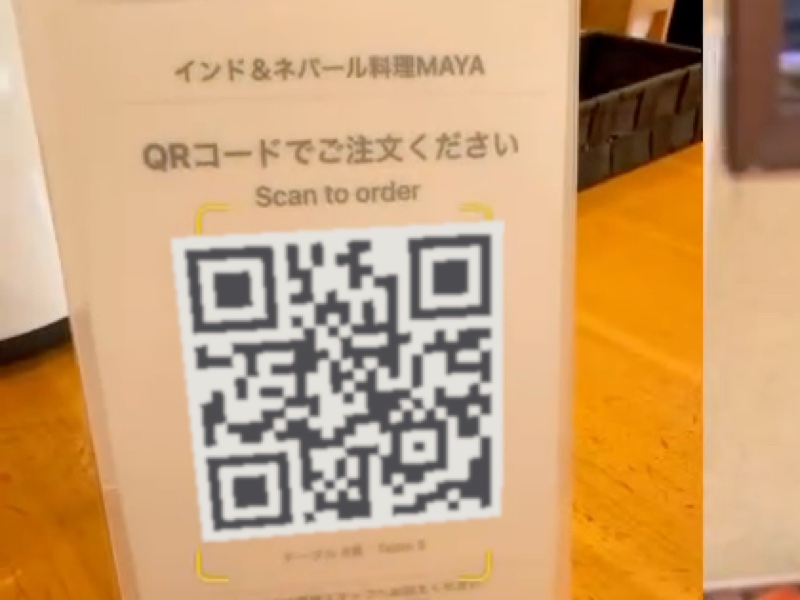
  1. 1Order by QR
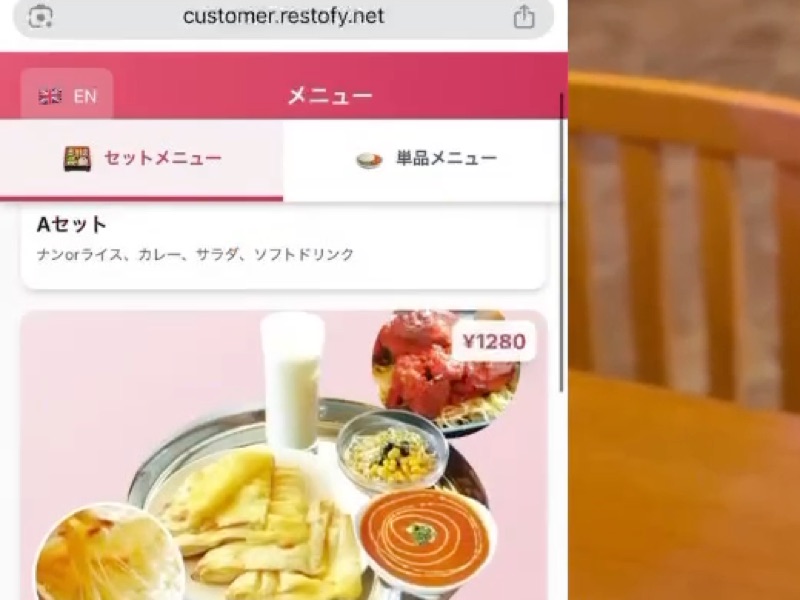
  2. 2Kitchen notified instantly
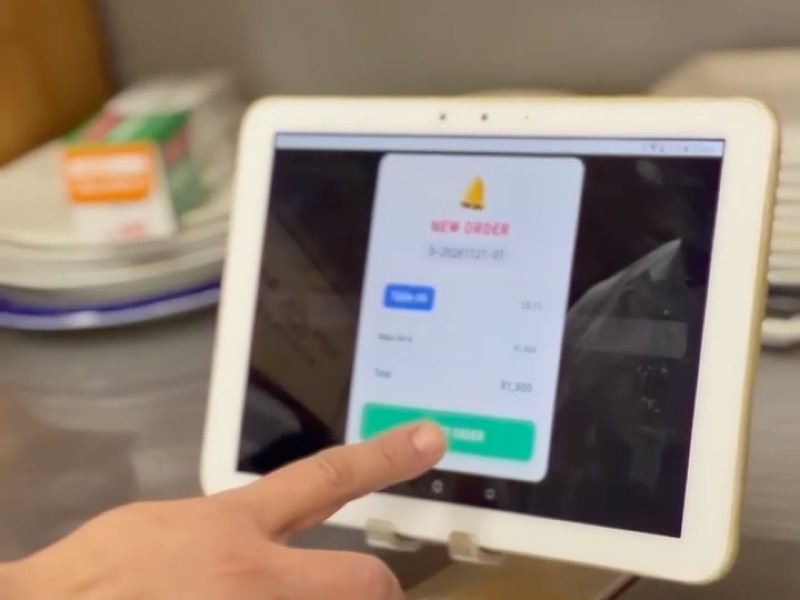
  3. 3Slip prints automatically
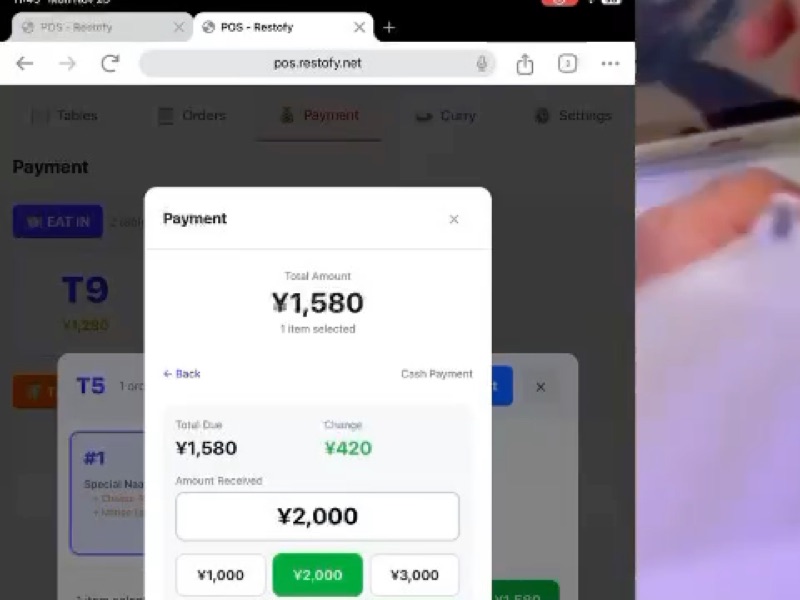
  4. 4Pay at the counter

Restofy: a simple system for small restaurants in Japan.

🗣️ Support in English, 日本語 and नेपाली

Video: an order at Maya, start to finish

Sound familiar?

  • At the lunch rush, just taking orders keeps everyone busy
  • Handwritten order slips get misheard or misread
  • Taking orders from customers who don't speak Japanese is hard
  • You lose track of which table hasn't paid yet
  • Big-name POS systems are expensive and have far more features than you need

About the developer

Subedi Krishna

Subedi Krishna

スベディ クリシュナ

IT engineer / restaurant owner

I have worked in restaurants for over 10 years as a restaurant manager. Today I run Maya, an Indian and Nepali restaurant in Fukuoka.

I am also an IT engineer with over 5 years of experience, building and running systems as a cloud engineer.

The lunch rush, order mistakes, confusion at the till: I built Restofy with my engineering skills to solve the problems I have seen in restaurants for more than a decade. It runs every day at Maya.

Certifications

9 AWS certifications

  • Solutions Architect – Professional
  • Generative AI Developer – Professional
  • Advanced Networking – Specialty
  • Security – Specialty
  • Machine Learning – Specialty
  • Solutions Architect – Associate
  • Machine Learning Engineer – Associate
  • Cloud Practitioner
  • AI Practitioner
  • HashiCorp Certified: Terraform Associate
  • Cisco CCNA

Languages: English, 日本語, नेपाली

Not a system designed at a desk, but one used, fixed and improved in a real restaurant.

How it works

  1. QR card on a table

    1

    Scan the QR code

    Customers scan the QR code on their table with their phone. No app to install.

  2. the menu on a phone

    2

    Order on the phone

    They choose from a menu with photos. Set menus are easy to pick, too.

  3. kitchen tablet and slip

    3

    Kitchen notified, slip printed

    When an order comes in, the kitchen tablet rings and the order slip prints automatically.

  4. the POS screen

    4

    Pay at the counter

    Each table's orders appear at the counter. Separate bills and splitting the bill are supported.

In use today

Indian & Nepali Restaurant Maya📍 Fukuoka

Running since
March 2026, every day
Tables
13
Ordering
QR self-ordering + staff ordering
Menu languages
Japanese, English

Run by the developer, and improved through daily service. The video at the top of this page is a real order at Maya. Before you decide, you can see the whole flow, from order to payment, in a working restaurant.

Features

  • QR self-ordering

    A QR code for each table. Printable QR cards included

  • Staff ordering

    For guests who don't use smartphones or QR, staff order for them on a phone. The order reaches the kitchen and POS just like a QR order

  • Set menus

    Combinations like curry + naan + drink, easy to set up

  • Kitchen display

    See and accept orders on a tablet. It keeps ringing until an order is accepted

  • Automatic slip printing

    Works with Star receipt printers

  • Counter and payments

    Bills by table or by customer, paying for selected items, records of cancellations

  • Takeout orders

    A dedicated takeout ordering screen

  • Sales and expenses

    Daily and monthly sales, cash and PayPay breakdown, expenses and cash balance

  • Japanese and English menu

    Customers switch language on their phone, so overseas guests can order with ease

Pricing

We suggest the right plan for your restaurant's size and needs.

  • Free consultation and quote
  • No fees on your sales
  • No long-term contract
  • Menu setup, QR cards and staff training included
  • You can use tablets you already own

Why Restofy

  • Used every day in a working restaurant
  • Up and running in about 1 week
  • Set up personally by the owner-developer
  • Support in English, 日本語 and नेपाली
  • Zero fees on sales

FAQ

How much does it cost?

It depends on the number of tables, the equipment you need and the size of your menu. Ask us for a free quote.

Do customers need to install an app?

No. They just scan the QR code with their phone and order.

What about guests who can't use smartphones or QR?

Staff pick the table on the staff order screen on a phone and order for them. The order goes to the kitchen and the POS just like a QR order, so nothing else changes.

Can I use the tablets I already have?

Yes, in most cases.

How long does setup take?

Usually about 1 week, depending on the size of your menu and what you need.

Can I see it in action?

Yes! Come and try it at Maya in Fukuoka. Just get in touch.

I'm not confident in Japanese. Is that OK?

Of course. We can help you in English or नेपाली.

Get in touch

You are welcome to come and try it at our restaurant.

LINE, WhatsApp, Messenger and phone contacts are coming soon.

Contact form

We usually reply the same day.